BlockUp Guides & Walkthroughs
Practical how-tos for La Bandite’s bike life sim — from first ride to workshop pro.
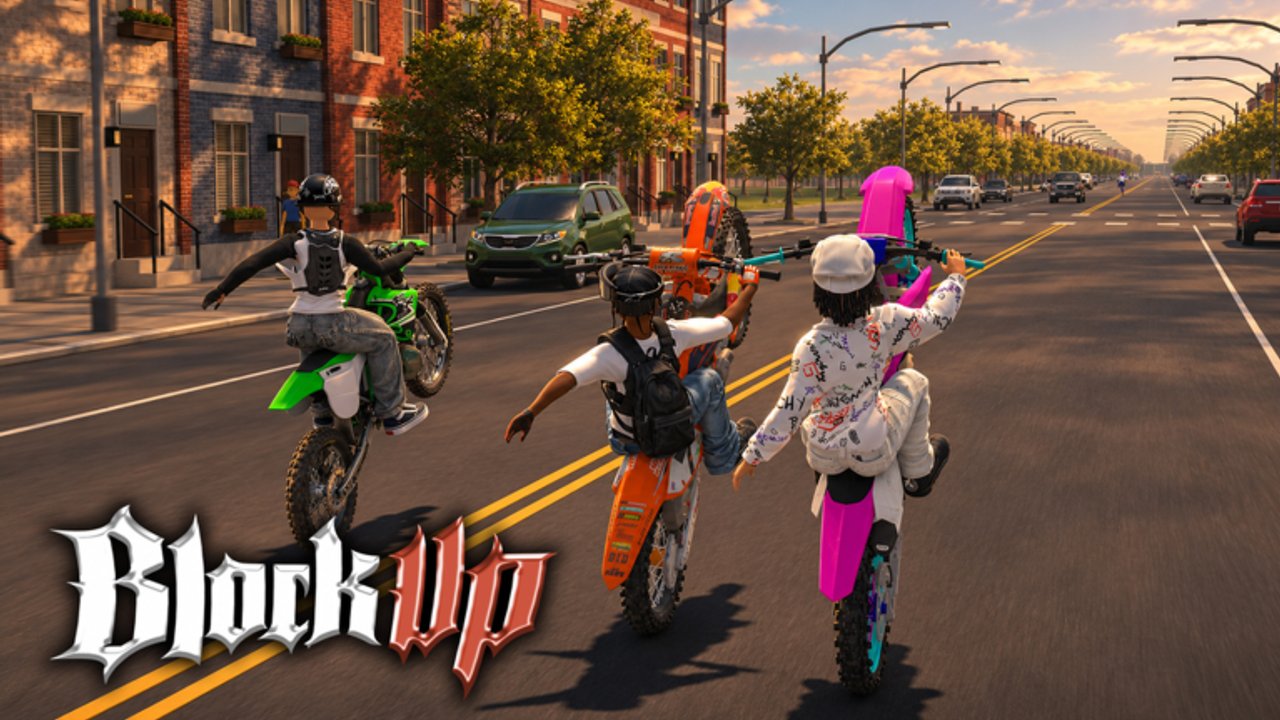
Welcome to the BlockUp guides hub. BlockUp is a free-to-play Roblox Bike Life vehicle simulation by La Bandite, with Version 1.0 live since around mid-October 2026. The experience puts you in a full city of streets, alleys, gas stations, garages, and a dealership, then asks you to ride, earn, customize, and socialize with realistic bike physics. Servers cap around 15 players, so sessions stay personal: cruise with friends, pick up passengers, run deliveries, or line up for a 1v1 wheelie duel.
This hub is the map for every tutorial on the wiki. If you just joined, start with Getting Started. If you already have a bike and want tricks, jump to How to Wheelie. Looking for cash? Use How to Earn Money. Prefer a clean input list? Open Controls. Ready to style the machine? Read Customize Your Bike. Want repair loops and side income? See Mechanic Jobs.
What BlockUp is about
BlockUp sits in the Simulation / Vehicle Sim space on Roblox, but the fantasy is street bike culture rather than arcade racing alone. You feel weight transfer when you pull a wheelie, tip forward into a stoppie, slide a drift, or hold a burnout. The city is not just a backdrop: gas stations and workshops support oil changes, washes, and fuel, while garages and the dealership feed progression. You can buy a garage, run mechanic jobs (flat tires, chains, wiring), and push deeper into workshop customization. Off the bike there is streetwear, basketball courts, photo mode, and pose creation and sharing — so the loop is ride, earn, upgrade, show off, then ride again with your group.
A controller is recommended for the physics. Keyboard and touch can work, but throttle, lean, and clutch-style inputs feel more natural on a pad when you are holding long wheelies or dueling. That advice shows up again in the Controls guide with practical setup tips.
Start here (first hour)
- Launch BlockUp from the Roblox place page and complete any onboarding prompts.
- Learn movement and camera on a quiet street before attempting stunts near traffic density.
- Follow Getting Started for spawn priorities, early money, and what to unlock first.
- Bookmark How to Earn Money so delivery, racing, and repair income stay clear.
- Practice safe wheelies away from walls, then try structured tips in How to Wheelie.
- Check Codes occasionally — no verified promo codes are listed yet, but the page tracks redemption when codes appear.
- Skim Updates after patches so physics or economy changes do not surprise you.
Guide index
Beginner path
- Getting Started — day-one checklist, city landmarks, early goals, and how the social server feel works with a 15-player cap.
- Controls — input expectations, why a controller helps, and habits that keep stunts consistent.
Skill and money path
- How to Wheelie — balance, clutch timing mindset, stoppies vs wheelies, and duel etiquette.
- How to Earn Money — riding income, deliveries, racing, mechanic side work, and smart spending.
- Mechanic Jobs — flat tires, chains, wiring, and how repair work fits the broader economy.
Stunts, care, and city systems
- Stunts — stoppies, drifts, and burnouts beyond basic wheelies.
- Bike Maintenance — oil, wash, fuel, and gas-station habits.
- Dealership — cash purchases vs Robux passes and quads.
- Passengers — two-up rides, crew etiquette, hangouts.
- Photo Mode — poses, streetwear, and capture tips.
Progression and style path
- Customize Your Bike — workshop flow, visual identity, and care loops (oil, wash, fuel).
- Cross-check the Tier List, Game Passes, and Best Quads.
- Browse Players and Wheelie Duels for social/competitive notes.
City systems you will keep using
Mobility and stunts. Wheelies, stoppies, drifts, and burnouts are core identity, not side mini-games. Photo mode and poses turn clean lines into shareable moments. Group rides and passengers make the same streets feel different when friends hop on.
Economy. Money comes from riding activity, deliveries, races, and mechanic work. Early cash should go toward reliability and access — fuel, basic repairs, and garage progress — before expensive cosmetics. The How to Earn Money page breaks priorities without inventing fake multipliers.
Workshop and ownership. Customization and garage ownership deepen attachment. Keep the bike washed and oiled so you are not stuck mid-session. Mechanic jobs teach the same systems from the service side: you learn what breaks because you fix it for others.
Social layer. Online co-op style riding is the default vibe: cruise, duel, shoot photos, hit a basketball court in streetwear, then roll out again. With roughly 2.2M+ visits and 98K favorites already, you will meet riders who know the alleys — be ready to learn from them and share poses politely.
How to use this wiki with the game
Use guides when you are stuck on a how, hubs when you need a menu, and updates when something feels different after a patch. Pair this hub with Codes for rewards, Scripts only if you understand Roblox safety risks, Wiki links for official and community destinations, and Updates for Version 1.0 changelogs as they land. Never treat unverified script sites as required reading for vanilla play — BlockUp is designed to be enjoyed as a free Roblox experience with its own physics and jobs.
When you finish a guide, link forward: after controls, practice wheelies; after money, unlock customization; after mechanic jobs, buy or upgrade garage space. That chain keeps progression intentional instead of random grinding.
Quality bar for every guide here
Each article aims for concrete BlockUp advice: real systems (city services, stunts, jobs, social features), no invented promo codes, and no fake YouTube IDs. If a control label or UI name changes in a patch, re-check Updates and the specific guide. Prefer a controller for physics practice. Ride with the server population in mind — fifteen players means your burnout in a busy plaza is content for everyone nearby, for better or worse.
Next steps
New riders: open Getting Started now. Returning riders: jump to How to Wheelie or Customize Your Bike. Grind-focused players: How to Earn Money plus Mechanic Jobs. Input confused: Controls. Then circle back here whenever you need the full index.
BlockUp rewards patience with the physics and curiosity about the city. Learn one clean wheelie, one reliable money route, and one workshop habit, then stack the rest. This hub will stay the front door as more specialized tutorials appear under /guides/.
Frequently Asked Questions
Quick answers to common BlockUp questions.
Which BlockUp guide should I read first?
Start with Getting Started for the first-hour plan, then Controls if inputs feel awkward, then How to Earn Money so upgrades stay funded.
Do these guides cover promo codes?
No. Codes live on the Codes hub. No verified BlockUp promo codes are listed yet; check that page when the community finds working ones.
Is a controller required?
Not required, but strongly recommended for realistic bike physics, long wheelies, and precise stoppies or drifts.
How many players are on a BlockUp server?
Servers support about 15 players max, which keeps rides social without huge race lobbies.
Who develops BlockUp?
BlockUp is developed by the La Bandite group on Roblox. Version 1.0 of the city experience is live as a free-to-play Bike Life sim.